Wallet Settings
Overview
Wallet Settings configures the digital wallet functionality in your store, including deposits, withdrawals, peer-to-peer transfers, and multi-currency support.
Accessing Wallet Settings
Navigate to: Settings > Wallet from the sidebar menu
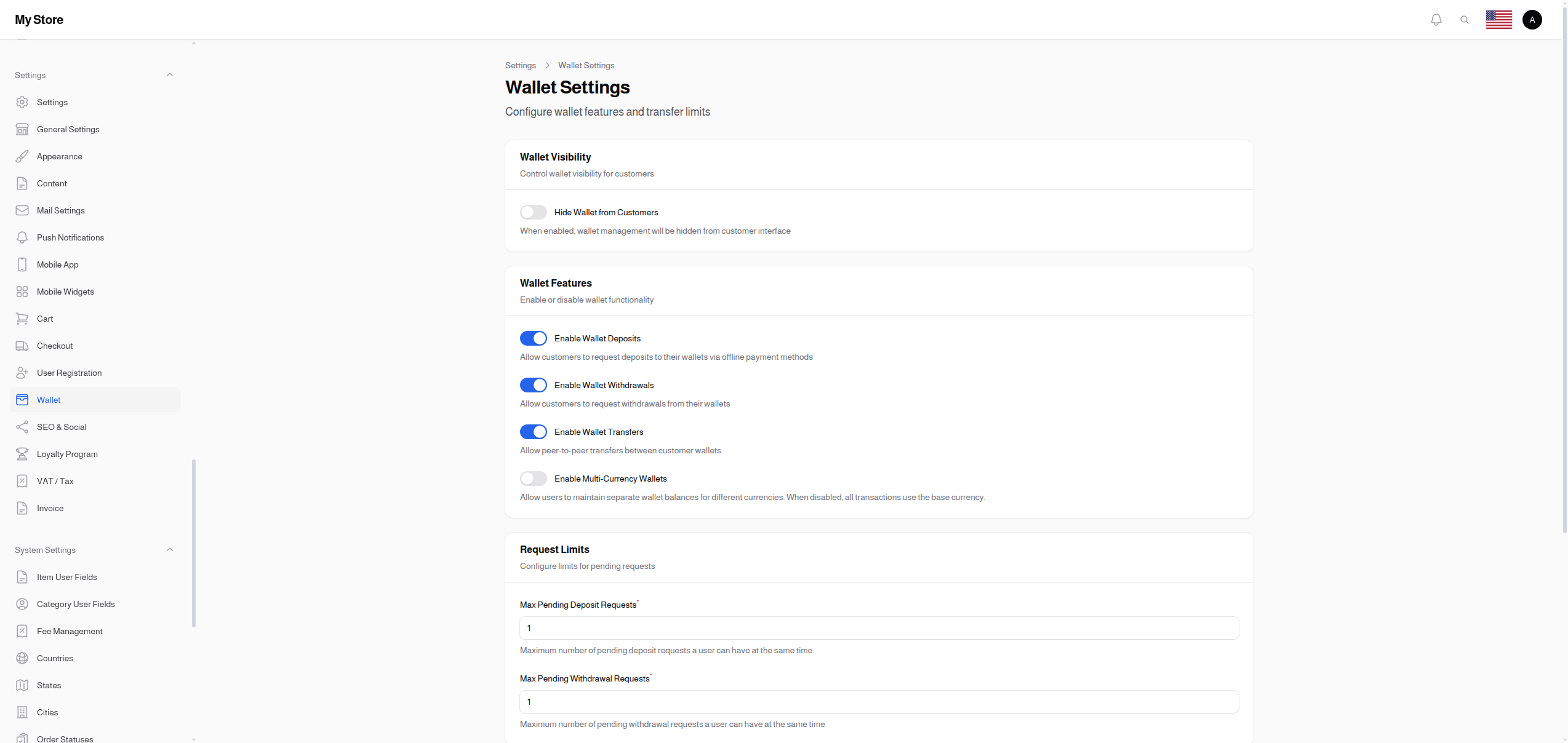
Wallet Visibility
Hide Wallet from Customers
- Type: Toggle switch (On/Off)
- Default: Off (wallet visible)
- Purpose: Control whether customers can see wallet features
When Enabled:
- Wallet section hidden from customer interface
- Customers cannot see their balance
- Admin can still manage wallets internally
- Useful for stores not using wallet features publicly
When Disabled:
- Customers see their wallet balance
- Can access deposit/withdrawal/transfer features (if enabled)
- Standard wallet functionality
Wallet Features
Enable Wallet Deposits
- Type: Toggle switch (On/Off)
- Default: On (enabled)
- Purpose: Allow customers to add money to their wallets
When Enabled:
- Customers can request deposits
- Uses offline payment methods for deposits
- Admin approves deposit requests
- Balance added after approval
When Disabled:
- No deposit functionality
- Admin can still credit wallets manually
Enable Wallet Withdrawals
- Type: Toggle switch (On/Off)
- Default: On (enabled)
- Purpose: Allow customers to withdraw money from their wallets
When Enabled:
- Customers can request withdrawals
- Must provide bank/payment details
- Admin processes withdrawal requests
- Useful for marketplace vendors receiving payments
When Disabled:
- No withdrawal functionality
- Wallet balance can only be spent in-store
Enable Wallet Transfers
- Type: Toggle switch (On/Off)
- Default: On (enabled)
- Purpose: Allow peer-to-peer transfers between customer wallets
When Enabled:
- Customers can send money to other users
- Transfer limits apply (see below)
- Useful for social/community features
When Disabled:
- No transfer functionality
- Wallet balance only for personal use
Enable Multi-Currency Wallets
- Type: Toggle switch (On/Off)
- Default: Off (single currency)
- Purpose: Allow users to maintain balances in multiple currencies
- Premium Feature: May require premium license
When Enabled:
- Users have separate balances per currency
- Can receive payments in different currencies
- Currency conversion may apply during transfers
When Disabled:
- All transactions use base currency
- Simpler wallet management
- Currency conversion at checkout only
Request Limits
Max Pending Deposit Requests
- Type: Number input
- Default: 1
- Minimum: 1
- Purpose: Limit how many pending deposits a user can have simultaneously
Why Limit Deposits:
- Prevents spam requests
- Easier admin management
- Users must complete existing requests first
Example: If set to 1, user must wait for deposit to be approved/rejected before creating another request.
Max Pending Withdrawal Requests
- Type: Number input
- Default: 1
- Minimum: 1
- Purpose: Limit how many pending withdrawals a user can have simultaneously
Why Limit Withdrawals:
- Prevents abuse
- Orderly processing for admin
- Security measure
Transfer Limits
These settings appear only when wallet transfers are enabled.
Minimum Transfer Amount
- Type: Currency input
- Default: 1.00
- Minimum: 0
- Purpose: Lowest amount users can transfer to each other
Set Higher To:
- Reduce transaction processing
- Prevent micro-transfers
- Align with business model
Maximum Transfer Amount
- Type: Currency input
- Default: 10,000.00
- Minimum: 0
- Purpose: Highest amount users can transfer in a single transaction
Set Lower To:
- Reduce fraud risk
- Comply with regulations
- Control large transfers
Set Higher To:
- Allow larger transactions
- Support B2B transfers
- Accommodate high-value customers
Wallet Use Cases
Standard E-commerce
Hide Wallet: Off
Deposits: On
Withdrawals: Off
Transfers: Off
Multi-Currency: Off
Customers can load wallet for purchases only.
Marketplace with Vendor Payouts
Hide Wallet: Off
Deposits: On (for customers)
Withdrawals: On (for vendors)
Transfers: Off
Multi-Currency: Off
Vendors can withdraw their earnings.
Community Platform
Hide Wallet: Off
Deposits: On
Withdrawals: On
Transfers: On
Transfer Min: 1.00
Transfer Max: 1,000.00
Users can send money to each other.
International Marketplace
Hide Wallet: Off
Deposits: On
Withdrawals: On
Transfers: On
Multi-Currency: On
Full wallet features with multi-currency support.
Saving Changes
Click the Save button at the bottom of the page to apply your changes.
Related Sections
- User Wallets - View and manage customer wallets
- Wallet Transactions - Transaction history
- Wallet Deposit Requests - Process deposits
- Wallet Withdrawal Requests - Process withdrawals
- Wallet Transfers - View transfer history
- Offline Payment Methods - Deposit payment options