Registration Settings
Overview
Registration Settings controls user account creation requirements, including which fields are mandatory, verification requirements, and country restrictions.
Accessing Registration Settings
Navigate to: Settings > User Registration from the sidebar menu
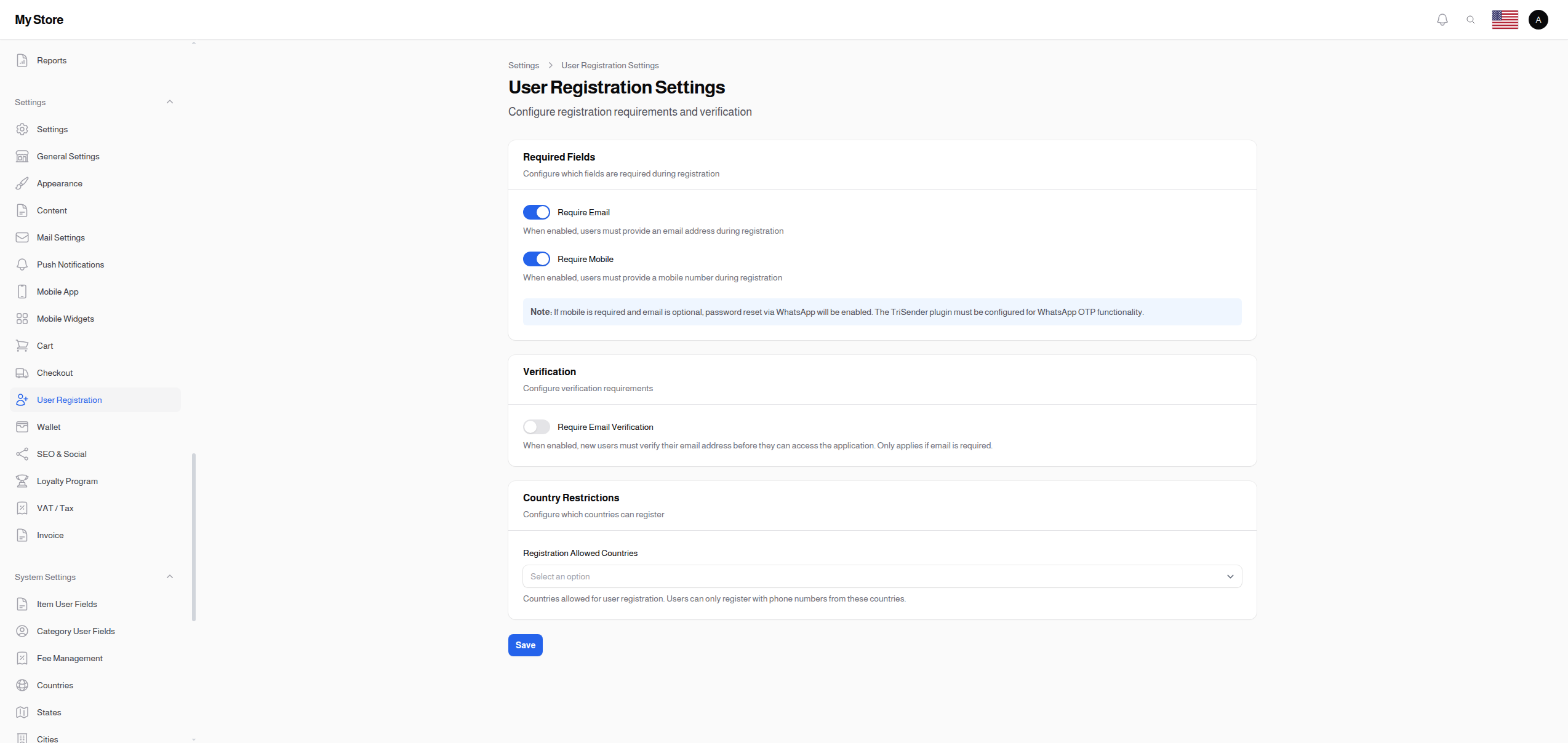
Required Fields
Configure which fields are mandatory during user registration.
Require Email
- Type: Toggle switch (On/Off)
- Default: On (required)
- Purpose: Make email address mandatory during registration
When Enabled:
- Users must provide an email address
- Email used for login and communication
- Standard for most stores
- Required for email-based password reset
When Disabled:
- Email is optional
- Users can register with phone only
- Alternative login methods needed
Constraint: At least one of Email or Mobile must be required.
Require Mobile
- Type: Toggle switch (On/Off)
- Default: On (required)
- Purpose: Make mobile phone mandatory during registration
When Enabled:
- Users must provide a mobile number
- Used for SMS notifications and WhatsApp
- Enables phone-based verification
- Required for WhatsApp-based features
When Disabled:
- Mobile is optional
- Email-only registration possible
Constraint: At least one of Email or Mobile must be required.
Password Reset via WhatsApp
Special Feature: If mobile is required and email is optional, password reset via WhatsApp is automatically enabled.
Requirements:
- Mobile must be required
- WhatsApp plugin must be configured for WhatsApp OTP functionality
This allows users who registered with only a phone number to reset their password via WhatsApp verification code.
Fields
Configure which optional fields to show during registration.
Show Email
- Type: Toggle switch (On/Off)
- Default: On
- Purpose: Show email field on registration form
When Enabled:
- Email field appears on registration form
- Users can optionally enter their email (if not required)
- Useful when email is optional but still desired
Note: This is different from "Require Email" - this controls visibility while "Require Email" controls whether it's mandatory.
Show Date of Birth
- Type: Toggle switch (On/Off)
- Default: Off
- Purpose: Allow users to provide their date of birth during registration
When Enabled:
- Date of birth field appears on registration form
- Users can optionally enter their birthday
- Useful for age-based marketing
- Can be used for birthday promotions
Use Cases:
- Birthday discount campaigns
- Age verification requirements
- Personalized marketing
- Customer demographics analysis
Show Gender
- Type: Toggle switch (On/Off)
- Default: Off
- Purpose: Allow users to select their gender during registration
When Enabled:
- Gender selection appears on registration form
- Users can optionally select their gender
- Useful for targeted marketing
Use Cases:
- Gender-specific product recommendations
- Targeted promotional campaigns
- Customer segmentation
- Demographic analytics
Verification
Require Email Verification
- Type: Toggle switch (On/Off)
- Default: Off (not required)
- Visibility: Only appears when "Require Email" is enabled
- Purpose: Force users to verify their email before accessing the app
When Enabled:
- Users receive verification email after registration
- Must click verification link
- Cannot access account until verified
- Reduces fake accounts and spam
When Disabled:
- Instant access after registration
- No verification needed
- Faster onboarding but potentially more fake accounts
Best For:
- Stores that need verified contact information
- Businesses with email-based marketing
- Reducing fraudulent accounts
Country Restrictions
Registration Allowed Countries
- Type: Multi-select dropdown (searchable)
- Default: SA, AE, KW, BH, OM, QA, JO, EG, LB, IQ (GCC + nearby)
- Purpose: Restrict user registration to specific countries
How It Works:
- Users can only register with phone numbers from selected countries
- Country is validated based on the phone number country code
- Restricts your customer base to target markets
Use Cases:
- Limit service to regions you can ship to
- Comply with local regulations
- Focus marketing on specific markets
- Control customer base geography
Configuration Tips:
- Select all countries you ship to
- Include countries where your customers are located
- Consider including nearby countries for broader reach
Configuration Examples
Standard E-commerce (Email + Phone)
✅ Require Email: On
✅ Require Mobile: On
❌ Require Email Verification: Off
Countries: Your shipping regions
Email-Only Registration
✅ Require Email: On
❌ Require Mobile: Off
✅ Require Email Verification: On
Countries: All supported
Phone-Only Registration (WhatsApp Focus)
❌ Require Email: Off
✅ Require Mobile: On
Countries: Your target markets
Note: Configure WhatsApp plugin for WhatsApp password reset.
High-Security Registration
✅ Require Email: On
✅ Require Mobile: On
✅ Require Email Verification: On
Countries: Restricted to primary markets
Validation Rules
At Least One Required
The system enforces that at least one of Email or Mobile must be required:
- Attempting to disable both shows a warning
- The toggle reverts to enabled state
- Ensures users always have a login method
Country Code Validation
When Require Mobile is enabled:
- Phone numbers are validated against selected countries
- Invalid country codes are rejected
- Users see clear error messages
Saving Changes
Click the Save button at the bottom of the page to apply your changes. Changes affect new registrations immediately (existing users are not affected).
Related Sections
- Users - Manage existing user accounts
- Checkout Settings - Checkout form fields
- Countries - Configure available countries
- Plugins - WhatsApp configuration