Invoice Settings
Overview
Invoice Settings configures the company information and footer content that appears on your invoices. Ensure your invoices contain all legally required business information.
Accessing Invoice Settings
Navigate to: Settings > Invoice from the sidebar menu
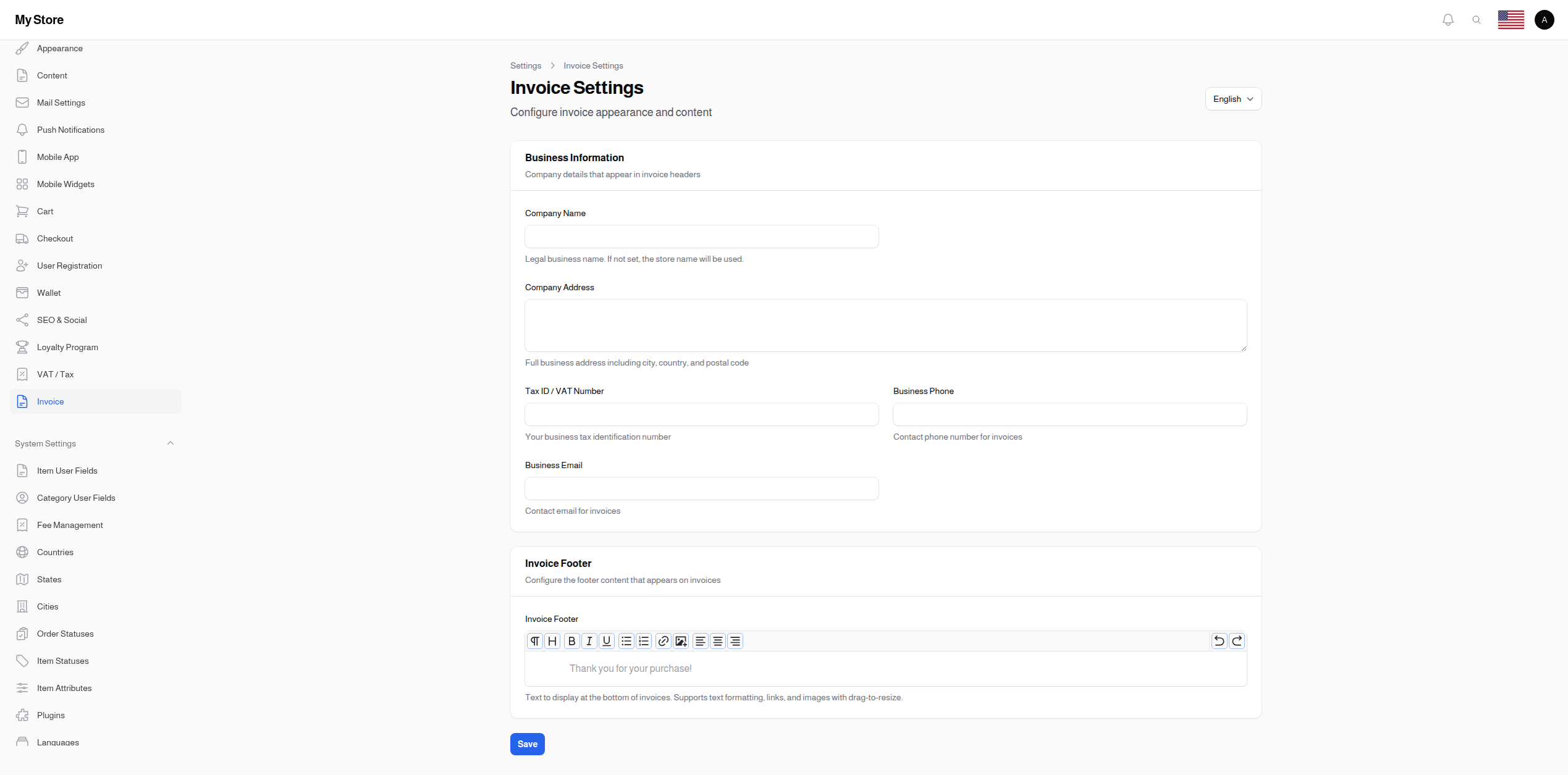
Business Information
Company details that appear in invoice headers.
Company Name
- Type: Text input
- Maximum Length: 255 characters
- Translatable: Yes
- Purpose: Legal business name on invoices
Usage:
- Appears at top of invoices
- Official business identification
- May differ from store name for legal purposes
Fallback: If not set, the Store Name from General Settings is used.
Examples:
- "ABC Trading Company LLC"
- "Fashion Boutique FZE"
- "Tech Solutions Ltd."
Company Address
- Type: Multi-line text area
- Rows: 3
- Translatable: Yes
- Purpose: Full business address on invoices
What to Include:
- Street address
- Building/suite number
- City
- State/Province
- Postal/ZIP code
- Country
Example:
123 Business Tower, Floor 5
Al Olaya District
Riyadh 12211
Kingdom of Saudi Arabia
Tax ID / VAT Number
- Type: Text input
- Maximum Length: 100 characters
- Purpose: Business tax identification number
Importance:
- Required for tax compliance
- Validates tax-exempt purchases
- Professional appearance
Examples by Region:
| Region | Format | Example |
|---|---|---|
| Saudi Arabia | 15-digit VAT | 310123456700003 |
| UAE | TRN | 100123456700003 |
| UK | GB + 9 digits | GB123456789 |
| EU | Country code + number | DE123456789 |
Business Phone
- Type: Phone number input
- Maximum Length: 50 characters
- Purpose: Contact phone for invoices
Usage:
- Customer inquiries about invoices
- Business contact information
- Professional appearance
Format: Include country code for international clarity
Example: +966 11 123 4567
Business Email
- Type: Email input
- Maximum Length: 255 characters
- Purpose: Contact email for invoices
Best Practices:
- Use professional domain email
- Consider using [email protected] or [email protected]
- Avoid personal email addresses
Example: [email protected]
Invoice Footer
Invoice Footer Content
- Type: Rich text editor (TipTap)
- Translatable: Yes
- Purpose: Custom content at bottom of invoices
Editor Features:
- Headings
- Bold, Italic, Underline
- Bullet lists, Numbered lists
- Links
- Images (with drag-to-resize)
- Text alignment (left, center, right)
What to Include:
- Thank you message
- Return policy summary
- Payment terms
- Bank account details (for bank transfers)
- Social media links
- Legal disclaimers
- QR codes (as images)
Example Footer:
Thank you for your purchase!

Payment Terms: Due upon receipt
Returns: 14-day return policy for unused items

For questions about this invoice, contact [email protected]

Follow us: @mycompany on Instagram

Image Support
The footer editor supports images:
- Accepted Formats: JPEG, PNG, GIF, WebP
- Maximum Size: 2MB per image
- Storage: Uploaded to
invoice-footer-attachmentsdirectory - Resizing: Drag corners to resize in editor
Use Cases for Images:
- Company logo (additional placement)
- QR codes for payments
- Certification badges
- Bank logos for transfer info
Invoice Preview
Your invoice will include:
Header Section
- Company Name (or Store Name)
- Company Address
- Tax ID / VAT Number
- Business Phone
- Business Email
- Store Logo
Body Section
- Invoice number and date
- Customer information
- Order details and line items
- Tax breakdown (if tax enabled)
- Total amount
Footer Section
- Custom footer content (from settings)
Legal Compliance
Required Information (Varies by Jurisdiction)
Most jurisdictions require invoices to include:
- [ ] Seller's legal name
- [ ] Seller's address
- [ ] Tax registration number
- [ ] Invoice number (unique)
- [ ] Invoice date
- [ ] Buyer's details
- [ ] Description of goods/services
- [ ] Quantity and unit price
- [ ] Total amount
- [ ] Tax amount and rate
VAT Invoice Requirements
For VAT-registered businesses:
- Tax ID must be visible
- Tax breakdown required
- Consider including QR code (required in some regions)
Record Retention
Invoices are stored in the system. Consult local regulations for required retention periods (typically 5-7 years).
Configuration Examples
Complete Business Invoice
Company Name: ABC Trading LLC
Address: Tower 5, Floor 10, Business Bay, Dubai, UAE
Tax ID: 100123456700003
Phone: +971 4 123 4567
Email: [email protected]
Footer: Thank you for your business! Payment due within 30 days.
Minimal Configuration
Company Name: [Leave empty - uses Store Name]
Address: [Leave empty]
Tax ID: [Leave empty if not registered]
Phone: [Leave empty]
Email: [Leave empty]
Footer: Thank you for your purchase!
Saving Changes
Click the Save button at the bottom of the page to apply your changes.
Note: Changes affect new invoices only. Previously generated invoices retain their original information.
Related Sections
- VAT / Tax Settings - Configure tax rates
- General Settings - Store name and logo
- Orders - View and print invoices